

The Nintendo Joy Con includes a button for taking screenshots or videos of gameplay — perfect for capturing unforgettable moments, hilarious antics, and epic wins. These files are then stored on the console's internal memory or on an optional microSD card in JPEG or MP4 format.
I use the SD card option, and every few months, when the card gets full, I pop it out of the Switch and dump the files onto my Mac. From there, I can create website galleries, social media thumbnails, or YouTube and TikTok clips.
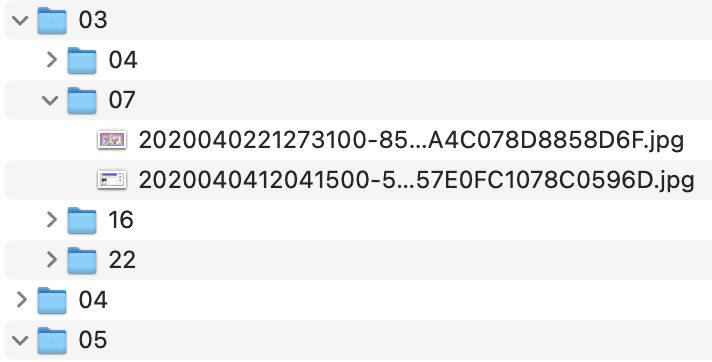
The only downside: Nintendo sorts the files into folders by year/month/day, and the filenames are inscrutable, such as 2017122820483800-F1C11A22FAEE3B82F21B330E1B786A39.jpg. All this tells me is when I took the screenshot, which is not as useful to me as knowing what games they're from. At best, this default organizational structure mean I have to open each file to identify, move, or rename it; at worst, if it's a screenshot from something I downloaded and then quickly deleted, I may have no memory of what the game was!
Nonetheless, there is some logic to those filenames. The first half (everything before the hyphen) is a timestamp; and the second half (everything between the hyphen and the period) is an identifier unique to the game. In the above example, F1C11A22FAEE3B82F21B330E1B786A39 means it's from Breath of the Wild!
Renan Greca, co-edtor of the Brazilian gaming website Neo Fusion, has developed a handy utility that relies on these identifiers for automatically sorting all the files by game title. His "Nintendo Switch Screenshot Organizer" doesn't change their filenames, but it does copy them into folders with more intuitive names, like "Super Mario Odyssey" or "Life Is Strange".
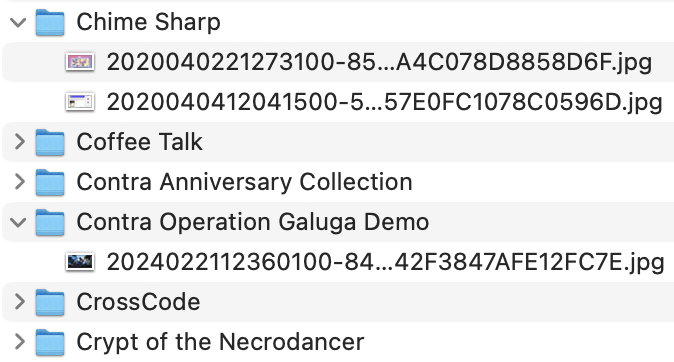
The program runs on Mac, Windows, and Linux (instructions for each are different), but there is a caveat: it has to be updated for each new game. At the time of this writing, the utility recognizes 551 different Switch games! If it encounters a game not on that list, it will sort what files it can and produce a report for the rest, like this:
Names not found for the following game IDs:

38236DD6F3CF1F60A8998C836EE22216
Found in: ./Album/2024/06/06/2024060622180800-38236DD6F3CF1F60A8998C836EE22216.jpg
If that happens to you and you're not tech-savvy, just copy and paste that report into this GitHub repository (free registration required). Include the name of the game, if possible; if not, attach the screenshot in question. Renan has given me access to update the official game list, and I'll make sure the next version includes your games!
